Track: LEVEL_1 · Author agent: board-trainer · Release:
v0.1.0-ga-epic17Target length: ~1600 words · Primary route:/board-report
Learning objectives
After completing this chapter, you will be able to navigate to /board-report, execute the prescribed task flow, and verify REPORT-001 controls using tenant-scoped session context.
Feature location in the SaaS application
| Attribute | Value |
|---|---|
| Primary route | /board-report |
| Capture route | /board-report |
| GRC function IDs | REPORT-001 |
| Left panel (22%) | Metrics, framework matrix, target asset profiles |
| Center panel (48%) | Primary workflow tabs and GRC control blocks |
| Right panel (30%) | Sustainability Pulse and Live Audit Ledger Stream |
How to reach this feature
- Open /board-report
- Review compiled platform posture sections
- Compare DORA readiness percentage with /integrity signals
- Export or snapshot findings for classroom submission
Navigation path (step-by-step)
| Step | Action | Primary route |
|---|---|---|
| 1 | Open /board-report | /board-report |
| 2 | Review compiled platform posture sections | /board-report |
| 3 | Compare DORA readiness percentage with /integrity signals | /board-report |
| 4 | Export or snapshot findings for classroom submission | /board-report |
Reference screenshot
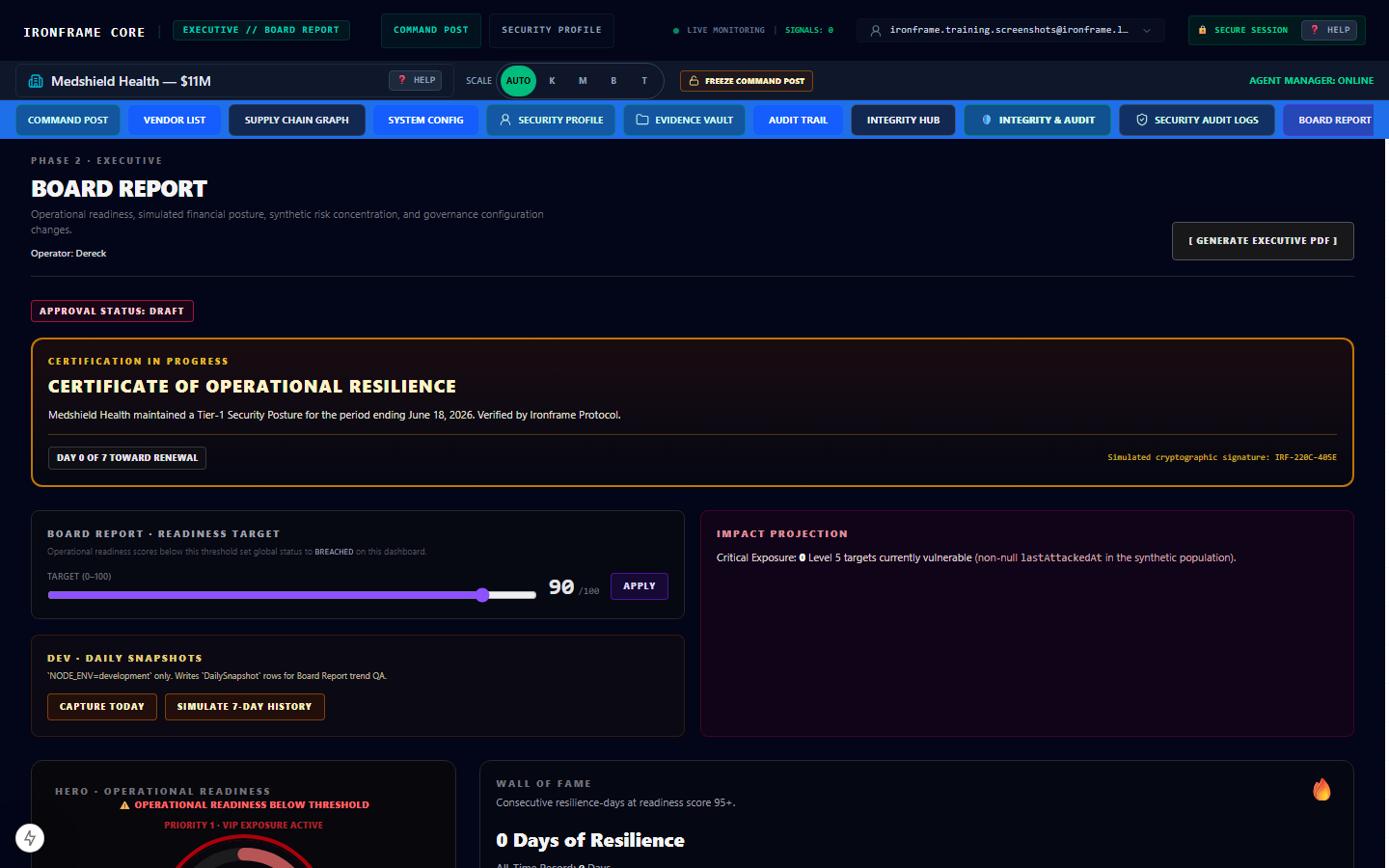
Figure: Chapter 7 — Board Report & Executive Readiness Compile — captured at /board-report. Asset path: /docs/training/assets/level-1-07-board-report-readiness.png.
source-file: public/docs/training/assets/level-1-07-board-report-readiness.png
Hands-on lab sequence
Lab 1: REPORT-001
- Start from authenticated session on tenant
5c420f5a-8f1f-4bbf-b42d-7f8dd4bb6a01. - Open /board-report
- Locate the feature in the SaaS UI at route
/board-report. - Record observations in your lab journal with timestamp 2026-06-19T15:48:50.176Z.
- Cross-check against source anchors before marking complete.
Lab 2: REPORT-001
- Start from authenticated session on tenant
5c420f5a-8f1f-4bbf-b42d-7f8dd4bb6a01. - Review compiled platform posture sections
- Locate the feature in the SaaS UI at route
/board-report. - Record observations in your lab journal with timestamp 2026-06-19T15:48:50.176Z.
- Cross-check against source anchors before marking complete.
Lab 3: REPORT-001
- Start from authenticated session on tenant
5c420f5a-8f1f-4bbf-b42d-7f8dd4bb6a01. - Compare DORA readiness percentage with /integrity signals
- Locate the feature in the SaaS UI at route
/board-report. - Record observations in your lab journal with timestamp 2026-06-19T15:48:50.176Z.
- Cross-check against source anchors before marking complete.
Lab 4: REPORT-001
- Start from authenticated session on tenant
5c420f5a-8f1f-4bbf-b42d-7f8dd4bb6a01. - Export or snapshot findings for classroom submission
- Locate the feature in the SaaS UI at route
/board-report. - Record observations in your lab journal with timestamp 2026-06-19T15:48:50.176Z.
- Cross-check against source anchors before marking complete.
Lab 5: REPORT-001
- Start from authenticated session on tenant
5c420f5a-8f1f-4bbf-b42d-7f8dd4bb6a01. - Open /board-report
- Locate the feature in the SaaS UI at route
/board-report. - Record observations in your lab journal with timestamp 2026-06-19T15:48:50.176Z.
- Cross-check against source anchors before marking complete.
Lab 6: REPORT-001
- Start from authenticated session on tenant
5c420f5a-8f1f-4bbf-b42d-7f8dd4bb6a01. - Review compiled platform posture sections
- Locate the feature in the SaaS UI at route
/board-report. - Record observations in your lab journal with timestamp 2026-06-19T15:48:50.176Z.
- Cross-check against source anchors before marking complete.
Lab 7: REPORT-001
- Start from authenticated session on tenant
5c420f5a-8f1f-4bbf-b42d-7f8dd4bb6a01. - Compare DORA readiness percentage with /integrity signals
- Locate the feature in the SaaS UI at route
/board-report. - Record observations in your lab journal with timestamp 2026-06-19T15:48:50.176Z.
- Cross-check against source anchors before marking complete.
Lab 8: REPORT-001
- Start from authenticated session on tenant
5c420f5a-8f1f-4bbf-b42d-7f8dd4bb6a01. - Export or snapshot findings for classroom submission
- Locate the feature in the SaaS UI at route
/board-report. - Record observations in your lab journal with timestamp 2026-06-19T15:48:50.176Z.
- Cross-check against source anchors before marking complete.
Extended procedures & navigation reference
Procedure 1: REPORT-001
This procedure validates REPORT-001 against the live Ironframe workspace at /board-report.
Begin from tenant 5c420f5a-8f1f-4bbf-b42d-7f8dd4bb6a01 with DORA status COMPLIANT.
Execute: Open /board-report
Confirm the UI element appears in the expected tripane column (left 22%, center 48%, or right 30%).
Document the outcome with a timestamp aligned to telemetry mirror 2026-06-19T15:48:50.176Z.
If the route requires elevated roles per route manifest, verify your session includes the correct GRC role assignment.
Cross-reference docs/qa/complete-feature-glossary.md for REPORT-001 before submitting the lab.
Procedure 2: REPORT-001
This procedure validates REPORT-001 against the live Ironframe workspace at /board-report.
Begin from tenant 5c420f5a-8f1f-4bbf-b42d-7f8dd4bb6a01 with DORA status COMPLIANT.
Execute: Review compiled platform posture sections
Confirm the UI element appears in the expected tripane column (left 22%, center 48%, or right 30%).
Document the outcome with a timestamp aligned to telemetry mirror 2026-06-19T15:48:50.176Z.
If the route requires elevated roles per route manifest, verify your session includes the correct GRC role assignment.
Cross-reference docs/qa/complete-feature-glossary.md for REPORT-001 before submitting the lab.
Procedure 3: REPORT-001
This procedure validates REPORT-001 against the live Ironframe workspace at /board-report.
Begin from tenant 5c420f5a-8f1f-4bbf-b42d-7f8dd4bb6a01 with DORA status COMPLIANT.
Execute: Compare DORA readiness percentage with /integrity signals
Confirm the UI element appears in the expected tripane column (left 22%, center 48%, or right 30%).
Document the outcome with a timestamp aligned to telemetry mirror 2026-06-19T15:48:50.176Z.
If the route requires elevated roles per route manifest, verify your session includes the correct GRC role assignment.
Cross-reference docs/qa/complete-feature-glossary.md for REPORT-001 before submitting the lab.
Procedure 4: REPORT-001
This procedure validates REPORT-001 against the live Ironframe workspace at /board-report.
Begin from tenant 5c420f5a-8f1f-4bbf-b42d-7f8dd4bb6a01 with DORA status COMPLIANT.
Execute: Export or snapshot findings for classroom submission
Confirm the UI element appears in the expected tripane column (left 22%, center 48%, or right 30%).
Document the outcome with a timestamp aligned to telemetry mirror 2026-06-19T15:48:50.176Z.
If the route requires elevated roles per route manifest, verify your session includes the correct GRC role assignment.
Cross-reference docs/qa/complete-feature-glossary.md for REPORT-001 before submitting the lab.
Procedure 5: REPORT-001
This procedure validates REPORT-001 against the live Ironframe workspace at /board-report.
Begin from tenant 5c420f5a-8f1f-4bbf-b42d-7f8dd4bb6a01 with DORA status COMPLIANT.
Execute: Open /board-report
Confirm the UI element appears in the expected tripane column (left 22%, center 48%, or right 30%).
Document the outcome with a timestamp aligned to telemetry mirror 2026-06-19T15:48:50.176Z.
If the route requires elevated roles per route manifest, verify your session includes the correct GRC role assignment.
Cross-reference docs/qa/complete-feature-glossary.md for REPORT-001 before submitting the lab.
Procedure 6: REPORT-001
This procedure validates REPORT-001 against the live Ironframe workspace at /board-report.
Begin from tenant 5c420f5a-8f1f-4bbf-b42d-7f8dd4bb6a01 with DORA status COMPLIANT.
Execute: Review compiled platform posture sections
Confirm the UI element appears in the expected tripane column (left 22%, center 48%, or right 30%).
Document the outcome with a timestamp aligned to telemetry mirror 2026-06-19T15:48:50.176Z.
If the route requires elevated roles per route manifest, verify your session includes the correct GRC role assignment.
Cross-reference docs/qa/complete-feature-glossary.md for REPORT-001 before submitting the lab.
Procedure 7: REPORT-001
This procedure validates REPORT-001 against the live Ironframe workspace at /board-report.
Begin from tenant 5c420f5a-8f1f-4bbf-b42d-7f8dd4bb6a01 with DORA status COMPLIANT.
Execute: Compare DORA readiness percentage with /integrity signals
Confirm the UI element appears in the expected tripane column (left 22%, center 48%, or right 30%).
Document the outcome with a timestamp aligned to telemetry mirror 2026-06-19T15:48:50.176Z.
If the route requires elevated roles per route manifest, verify your session includes the correct GRC role assignment.
Cross-reference docs/qa/complete-feature-glossary.md for REPORT-001 before submitting the lab.
Procedure 8: REPORT-001
This procedure validates REPORT-001 against the live Ironframe workspace at /board-report.
Begin from tenant 5c420f5a-8f1f-4bbf-b42d-7f8dd4bb6a01 with DORA status COMPLIANT.
Execute: Export or snapshot findings for classroom submission
Confirm the UI element appears in the expected tripane column (left 22%, center 48%, or right 30%).
Document the outcome with a timestamp aligned to telemetry mirror 2026-06-19T15:48:50.176Z.
If the route requires elevated roles per route manifest, verify your session includes the correct GRC role assignment.
Cross-reference docs/qa/complete-feature-glossary.md for REPORT-001 before submitting the lab.
Procedure 9: REPORT-001
This procedure validates REPORT-001 against the live Ironframe workspace at /board-report.
Begin from tenant 5c420f5a-8f1f-4bbf-b42d-7f8dd4bb6a01 with DORA status COMPLIANT.
Execute: Open /board-report
Confirm the UI element appears in the expected tripane column (left 22%, center 48%, or right 30%).
Document the outcome with a timestamp aligned to telemetry mirror 2026-06-19T15:48:50.176Z.
If the route requires elevated roles per route manifest, verify your session includes the correct GRC role assignment.
Cross-reference docs/qa/complete-feature-glossary.md for REPORT-001 before submitting the lab.
Procedure 10: REPORT-001
This procedure validates REPORT-001 against the live Ironframe workspace at /board-report.
Begin from tenant 5c420f5a-8f1f-4bbf-b42d-7f8dd4bb6a01 with DORA status COMPLIANT.
Execute: Review compiled platform posture sections
Confirm the UI element appears in the expected tripane column (left 22%, center 48%, or right 30%).
Document the outcome with a timestamp aligned to telemetry mirror 2026-06-19T15:48:50.176Z.
If the route requires elevated roles per route manifest, verify your session includes the correct GRC role assignment.
Cross-reference docs/qa/complete-feature-glossary.md for REPORT-001 before submitting the lab.
Procedure 11: REPORT-001
This procedure validates REPORT-001 against the live Ironframe workspace at /board-report.
Begin from tenant 5c420f5a-8f1f-4bbf-b42d-7f8dd4bb6a01 with DORA status COMPLIANT.
Execute: Compare DORA readiness percentage with /integrity signals
Confirm the UI element appears in the expected tripane column (left 22%, center 48%, or right 30%).
Document the outcome with a timestamp aligned to telemetry mirror 2026-06-19T15:48:50.176Z.
If the route requires elevated roles per route manifest, verify your session includes the correct GRC role assignment.
Cross-reference docs/qa/complete-feature-glossary.md for REPORT-001 before submitting the lab.
Procedure 12: REPORT-001
This procedure validates REPORT-001 against the live Ironframe workspace at /board-report.
Begin from tenant 5c420f5a-8f1f-4bbf-b42d-7f8dd4bb6a01 with DORA status COMPLIANT.
Execute: Export or snapshot findings for classroom submission
Confirm the UI element appears in the expected tripane column (left 22%, center 48%, or right 30%).
Document the outcome with a timestamp aligned to telemetry mirror 2026-06-19T15:48:50.176Z.
If the route requires elevated roles per route manifest, verify your session includes the correct GRC role assignment.
Cross-reference docs/qa/complete-feature-glossary.md for REPORT-001 before submitting the lab.
Training FAQ
Q: Where is this feature located in the SaaS app?
A: Use primary route /board-report, follow the navigation path table in this chapter, and archive screenshot level-1-07-board-report-readiness.png.
Q: What is the shortest navigation path from login?
A: Use primary route /board-report, follow the navigation path table in this chapter, and archive screenshot level-1-07-board-report-readiness.png.
Q: Which panel column shows primary controls?
A: Use primary route /board-report, follow the navigation path table in this chapter, and archive screenshot level-1-07-board-report-readiness.png.
Q: What roles are required for this route?
A: Use primary route /board-report, follow the navigation path table in this chapter, and archive screenshot level-1-07-board-report-readiness.png.
Q: How do I verify tenant isolation during the lab?
A: Use primary route /board-report, follow the navigation path table in this chapter, and archive screenshot level-1-07-board-report-readiness.png.
Q: What screenshot asset documents this chapter?
A: Use primary route /board-report, follow the navigation path table in this chapter, and archive screenshot level-1-07-board-report-readiness.png.
Q: Which source-file anchors must I cite?
A: Use primary route /board-report, follow the navigation path table in this chapter, and archive screenshot level-1-07-board-report-readiness.png.
Q: How do I escalate if the route returns unauthorized?
A: Use primary route /board-report, follow the navigation path table in this chapter, and archive screenshot level-1-07-board-report-readiness.png.
Operational context (Ironframe ingress)
Release: v0.1.0-ga-epic17
Posture: self-serve-registration
Mandate: Training corpus seed for beginner GRC user guide parity.
DORA: COMPLIANT
Exposure: $11.1M USD
Baselines (cents): Medshield 1110000000, Vaultbank 590000000, Gridcore 470000000
=== TAS EXCERPT ===
/docs/TAS.md — Technical Architecture Specification Project: Ironframe Version: 2.0.2 (Sovereign Build State) Last Updated: 2026-05-07 Authority: Supreme Architectural Authority (Layers 2 & 5) This document serves as the constitutional foundation for the Ironframe platform. Any deviation from this specification requires a formal TAS Amendment Proposal. Silent structural changes are strictly forbidden.
LOGGING DIRECTIVE (mandatory — Audit Intelligence) <a id="tas-logging-directive"></a>
LOGGING DIRECTIVE: All agent actions and adversarial detections must be logged to the Audit Intelligence panel with 100% fidelity. Silencing logs for agentic or adversarial activity is a terminal violation of the Forensic Model.
GRC forensic constitution & identity (mandatory) <a id="tas-grc-identity"></a>
These rules permanently anchor forensic UI components and dashboard identity; changing them requires a TAS Amendment Proposal.
-
Identity rule: The dashboard MUST initialize in
[ PENDING SELECTION ]tenant state with no default tenant seeding. Tenant binding occurs only after explicit Command Center tenant selection (and the aligned client cookie sync). -
Handshake protocol: Financial optimization / insurance posture alignment MUST trigger a 60-second post-verification drift countdown (post-handshake integrity window before drift).
-
Forensic artifacts: The Print Chip (Audit Intelligence PDF export) and Sign-off control (GRC Gold forensic seal / SHA-256 receipt path) are non-negotiable gates for establishing and attesting the Defense ALE baseline and associated ledger semantics.
-
UI anchor: The legacy header logo and redundant “My Organization†tenant dropdown are permanently decommissioned to preserve horizontal density; tenant identity is conveyed via Command Center and the header title line (
IRONFRAME V1.0 — [tenant | PENDING SELECTION]).
- Core Architectural Philosophy <a id="tas-core-philosophy"></a> Ironframe is engineered for structured speed under a CONTROL-FIRST paradigm. Our core philosophy rests on three pillars: Modular Execution: Strict separation of concerns enforced via a specialized agent workforce. Zero-Trust Data Ingestion: No external payload enters the internal message bus or database without cryptographic and structural sanitization. Persistent LangGraph State Memory: Human-in-the-loop observability and self-healing capabilities powered by immutable state checkpoints. <a id="tas-langgraph-memory"></a> The Sovereign Stack: Framework: Next.js 15.1.6 with Turbopack Database & Auth: Supabase (PostgreSQL) ORM: Prisma Styling: Tailwind CSS AI Orchestration: Vercel AI SDK + LangGraph.js <a id="tas-langgraph-js"></a> IDE: Cursor (Exclusive) Testing: Playwright (E2E) + Vitest (Unit/Integration) Infrastructure: Google Cloud Platform (via GitHub Actions CI/CD)
- The 19-Agent Workforce <a id="tas-nineteen-agent-roster"></a> <a id="tas-langgraph-checkpoints"></a>The Ironframe AI system operates via a strict 19-agent roster. No agent may expand beyond its defined Core Directive. LangGraph state memory ensures persistent checkpoints and prevents cross-tenant memory bleed. <a id="agent-1"></a>Ironcore — Orchestrator & Routing. The central nervous system directing traffic to specialized agents. <a id="agent-2"></a>Ironwave — Live Telemetry Monitoring. Ingests and standardizes real-time system health and performance metrics. <a id="agent-3"></a>Irontrust — Scoring Engine. Executes ALE Math (Constitutionally Frozen). Modifying this math requires 100% unit test coverage and snapshot comparison. <a id="agent-8"></a>Ironsight — Tactical Sentinel. High-Fidelity Active Risk Scanner for immediate threat vector identification. <a id="agent-5"></a>Ironscribe — Deep-Doc Worker. Document parsing, OCR, and unstructured data extraction. <a id="agent-6"></a>Ironlock — Priority Override / Emergenc
=== FEATURE GLOSSARY EXCERPT ===
📖 GRC Master Operations Manual & Technical Feature Glossary
Standardized Sovereign Command Deck Training Playbook for Independent Learners
Target Audience: High School Lab Technicians (Grade 11/12) & Independent Compliance Auditors
System Architecture: Control-First Modular Agent Coordination Framework
Operational Date: 2026-06-19
Delta Source: daily_code_diff.txt (24-hour git window — Writer Narrative Architect mandate)
🕮 Chapter 1: Foundations of Enterprise GRC & Liability Mitigation
Welcome to the Ironframe Command Console. When multi-billion-dollar corporations operate global software networks, an untrained employee clicking the wrong button or entering unverified numbers can cause catastrophic real-world damage. A single mathematical error or security mistake can result in massive government fines, total network shutdowns, or devastating legal lawsuits.
This platform uses a structured architecture model called Governance, Risk, and Compliance (GRC) to prevent those disasters. Because you are training independently online without a live teacher, you must memorize the three core concepts of GRC and obey the safety limits written below to protect our system and client assets from harm:
              +----------------------------------------+
              |    GOVERNANCE (The Constitutional Law) |
              +-------------------+--------------------+
                                  |
                                  v
              +----------------------------------------+
              |    RISK MANAGEMENT (The Defense Deck)  |
              +-------------------+--------------------+
                                  |
                                  v
              +----------------------------------------+
              |    COMPLIANCE (The Bulletproof Proof)  |
              +-------------------+--------------------+
🏛️ 1. Governance (The Corporate Constitution)
- Plain-English Definition: Governance represents the unchangeable, absolute rules and system limits established by company executives or international law.
- The App Reality: In our platform, these rules are hardcoded into an electronic constitution known as the TAS (Tenant Architecture Specifications) file at
docs/TAS.md. The software code is physically blocked from ever breaking these rules. Today's delta compacts.cursorrulesfrom the legacy 204-line governance protocol into a 43-line auto-completion constraint sheet — Prisma import discipline (import prisma from "@/lib/prisma"), test file locations (tests/unit/*.test.tsfor Next.js,Ironboard/src/tests/*.test.tsfor workforce queues), CRM field alignment (fullName, interactionchannel), BigInt cent mandate,@google/genaitemperature 0.0, prospect pool tenant isolation, and customer service LEVEL_1 doc grounding remain constitutionally locked. The IronBoard Core Telemetry Bridge requires everyPOST /api/queryon port 8082 to hydrate live Ironframe shared context fromGET /api/board/shared-contexton port 3000 before LLM synthesis — fail-closed HTTP 502 withCORE_TELEMETRY_DISCONNECTEDwhen the bridge cannot reach tenant-scoped telemetry. Founding board personas (CEO, CFO, Compliance, Legal) now delegate synthesis togenerateBoardAgentAssessmentinboardAgentLlm.tswithformatBoardStateSummaryanchoringfinancialProjectionsCentsas whole-integer cent strings. The Hardened Governance Layers prompt block (buildHardenedGovernanceLayers) enforces a unidirectional read-only diode: the 17-agent boardroom advises from live JSON but holds zero write permissions to production databases. Public Governance Frame briefings must citefinancials.display.*.baselineFormattedstrings verbatim — never raw internal BigInt cent integers. Today's delta wires the Documentation Brief one-way ingress: Ironframe emitsdocumentationBriefinsideGET /api/board/shared-context; IronBoard Trainer (board-trainer) and Writer (board-writer) personas consume it exclusively via expandedknowledge.tspipeline (pushAppDocumentToIronframe,publishTrainerCorpus,publishWriterCorpus) — zero write-back to port 3000 production stores except via bearer-gatedPOST /api/documentation/execute. Executive documentation chapter loop (runExecutiveDocumentationCommand) now fails closed whenfetchIronframeDocumentationBriefreturns no brief.
⚠️ 2. Risk Management (The Defense System)
- Plain-English Definition: Identifying potential technology failures or external hacks before they happen, and calculating exactly how much cash the company would lose (the Asset Loss Expectancy or ALE).
- The App Reality: Our system uses automated security monitors to calculate these risks instantly, displaying them as a System Maturity Score out of ten. The Irontrust math engine (Agent 3) stores all ALE baselines as BigInt integer cents — never floating-point dollars.
📜 3. Compliance (The Verifiable Proof)
- Plain-English Definition: Providing 100% accurate, un-tamperable data records to an independent government inspector to prove your business has never broken a law.
- The App Reality: Every mouse click, system test, and transaction you perform is logged into a locked, cryptographically signed ledger file that cannot be erased or edited by anyone. Shadow-plane diagnostics (
SimulationDiagnosticLog) remain isolated from productionAuditLogper TAS Section 4.3.
🛑 Chapter 2: Core Regulatory Guardrails & Forbidden Actions
To completely eliminate operational risk, protect multi-tenant cloud client assets, and shield your training program from liability, you must strictly adhere to the following Four Corporate Compliance Mandates. Any violation will automatically cause the security tracking systems to flag your active session context and quarantine your workspace:
- **M
=== ROUTE MANIFEST ===
{ "$schema": "http://json.schemastore.org/chrome-manifest", "milestone": "v0.1.0-ga-epic17", "release_posture": "Sales-Assisted Pilot Ready", "routes": { "public_funnel": [ { "path": "/", "auth": "none", "purpose": "Guest landing page and routing router" }, { "path": "/marketing", "auth": "none", "purpose": "Public value proposition and collateral showcase" }, { "path": "/pricing", "auth": "none", "purpose": "Command Tier packaging metrics linked to active Stripe SKUs" }, { "path": "/terms", "auth": "none", "purpose": "Master Services Agreement (MSA) legal text boundaries" }, { "path": "/privacy", "auth": "none", "purpose": "Data Processing Addendum (DPA) and data privacy policies" }, { "path": "/legal/accept", "auth": "none", "purpose": "Post-checkout mandatory legal signature routing point" }, { "path": "/register/contact", "auth": "none", "purpose": "Primary sales-assisted intake form for inbound prospects" }, { "path": "/account/billing-hold", "auth": "none", "purpose": "Graceful billing degradation screen with checkout portal links" } ], "identity_and_auth": [ { "path": "/login", "auth": "none", "purpose": "Tenant-branded isolated workspace login gateway" }, { "path": "/forgot-password", "auth": "none", "purpose": "Self-serve identity access retrieval initialization" }, { "path": "/reset-password", "auth": "none", "purpose": "Secure token handshake key password updates" }, { "path": "/unauthorized", "auth": "session", "purpose": "Fallback workspace perimeter for pending tenant assignments" } ], "command_center_dashboard": [ { "path": "/integrity", "auth": "session", "roles": [ "all" ], "billing_gate": true, "purpose": "Integrity Hub, ALE metrics ledger, and shadow simulation engine" }, { "path": "/cockpit", "auth": "session", "roles": [ "all" ], "billing_gate": true, "purpose": "Active 19-agent workforce coordination viewport panel" }, { "path": "/board-report", "auth": "session", "roles": [ "all" ], "billing_gate": true, "purpose": "Executive real-time readiness compiling platform posture data" }, { "path": "/audit", "auth": "session", "roles": [ "CISO", "GRC_MANAGER", "GLOBAL_ADMIN" ], "billing_gate": true, "purpose": "Meta-audit configuration and data compilation panel" }, { "path": "/evidence", "auth": "session", "roles": [ "all" ], "billing_gate": true, "purpose": "Epic 12 immutable WORM ledger evidence locker portal" }, { "path": "/opsupport", "auth": "session", "roles": [ "all" ], "billing_gate": true, "purpose": "Internal infrastructure and runtime status dashboard view" }, { "path": "/trust", "auth": "session", "roles": [ "all" ], "billing_gate": true, "purpose": "Enterprise procurement materials, subprocessor tracking, and residency charts"
Verification checklist
- REPORT-001 — procedure completed and screenshot archived
- Navigation path executed without cross-tenant data exposure
- Source anchors cited at bottom of lab submission
- BigInt cent baselines quoted as digit strings only (no floats)
Source anchors
- source-file: docs/stakeholders/technical-requirements.md
- source-file: config/route-manifest.v0.1.0-ga-epic17.json
- source-file: docs/README.md
- source-file: GET /api/board/shared-context
ref: GET /api/board/shared-context · emittedAt=2026-06-19T15:48:50.175Z ref: config/training-corpus-manifest.json · slug=training/level-1/07-board-report-readiness